
I Tested “Active Intelligence 3.0: Wavelength” to Run Marketing for a Small Business
What Active Intelligence 3.0: Wavelength does for a small business, tested on a fresh ActiveCampaign account, with real screenshots and its limits.
We know, you know, you should email your customers this week. You open your email tool, stare at a blank template, and close it again. You think, maybe next week.
You’re not alone. In Constant Contact’s 2025 survey of 2,500 small business decision-makers, 44% called email their most effective marketing channel, yet 41% said they struggle to get people to open or click, and the most common marketing frustration was simply not knowing what’s working.
The questions owners type into Google say the same thing: What should I send my email list? Why is nobody clicking my emails? Is my automation even working?
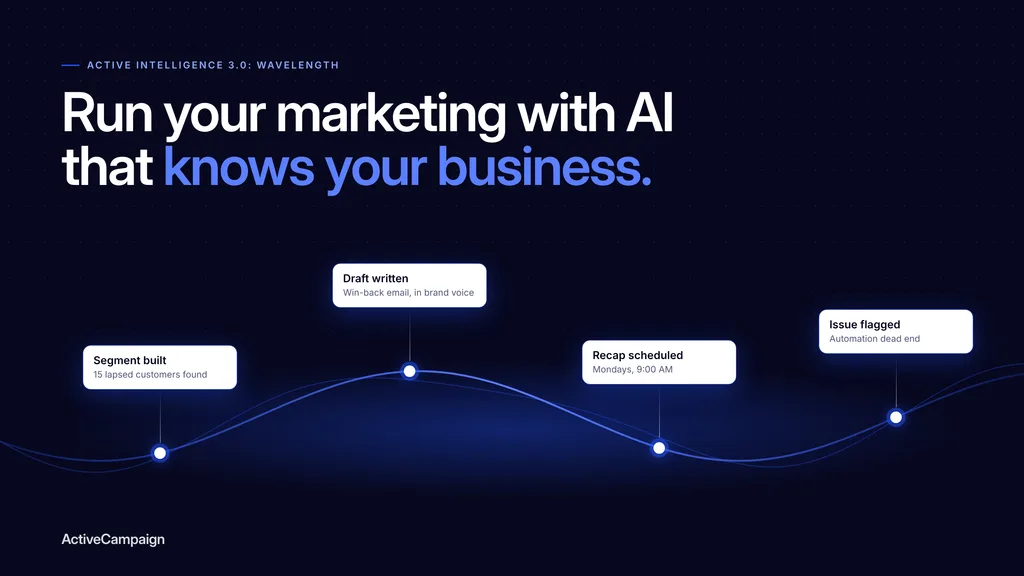
Active Intelligence 3.0: Wavelength, ActiveCampaign’s latest AI release, claims to answer those questions before you ask them. It watches your account, drafts the next campaign, picks who should get it and flags what’s broken. I put it to work for a small online coffee roaster to find out which of those jobs you can actually hand over, and which you still can’t.
This post contains affiliate links. If you sign up through them, I may earn a commission at no extra cost to you.
| Quick Verdict What it takes off your plate: remembering your brand, finding the right customers for a campaign, researching your market and sending you a weekly recap. What you still own: checking its work. It wrote an email with no link, missed a broken automation, and made that automation worse when asked to fix it. Best for: teams of one to five where email drives revenue and nobody watches the account every day. |
What Active Intelligence 3.0: Wavelength actually does for you
Most tools wait for you to tell them what to do. Active Intelligence 3.0: Wavelength is ActiveCampaign’s attempt to flip that. It’s the AI built into your ActiveCampaign account, and it learns from what’s already there: your customer list, past campaigns, automations and brand. Instead of a blank page, you get suggestions, drafts and warnings.
In plain terms, it promises four kinds of help:
- Knowing your business: it remembers your brand, studies what’s working and keeps an eye on competitors and the calendar.
- Doing the next task before you ask: it drafts campaigns, sends you a weekly report and watches your automations.
- Handling the fiddly jobs: it builds emails, translates them and checks your account for problems.
- Working with your other tools: it connects to Claude, ChatGPT and the rest of your marketing apps.
Promises are easy to write into release notes. The only way to know which ones hold up is to hand it a real business problem.
Putting it to work
Meet Saltmarsh Coffee Co., a small online roaster that sells bags of coffee and monthly subscriptions. It’s fictional, but its problem isn’t: 15 of its 60 customers haven’t ordered in three months, the holidays are coming, and there’s no marketer to win them back. All it has is a one-page brand guide and an owner with no spare time.
That’s the job I gave Wavelength, on a brand-new ActiveCampaign account with no history to learn from, which is the hardest case for an AI that claims to know your business. Every email went to real inboxes (mine), and every screenshot below comes from that account. Here’s how it handled the questions every small business owner asks, in the order you’d ask them.
1. Where do I even start? (Setup and import)
Most small businesses open a new email platform to a blank dashboard and a vague sense that they should be “doing more email”. Wavelength skips the blank page.
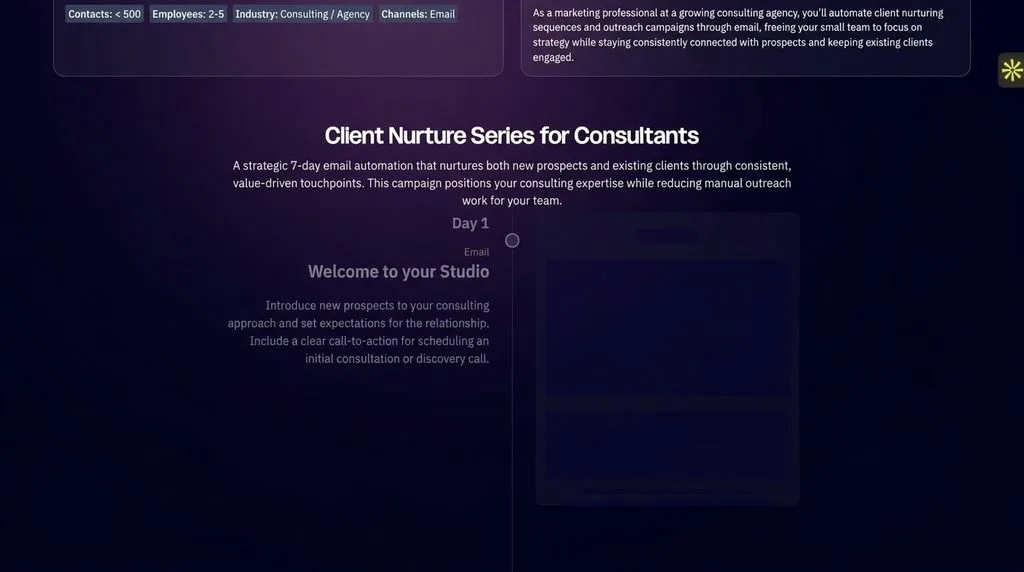
After signup, it showed “Your personalized marketing strategy”, built from a few form answers, with a ready-made 7-day nurture series of three drafted emails and two matching automations waiting in the account.
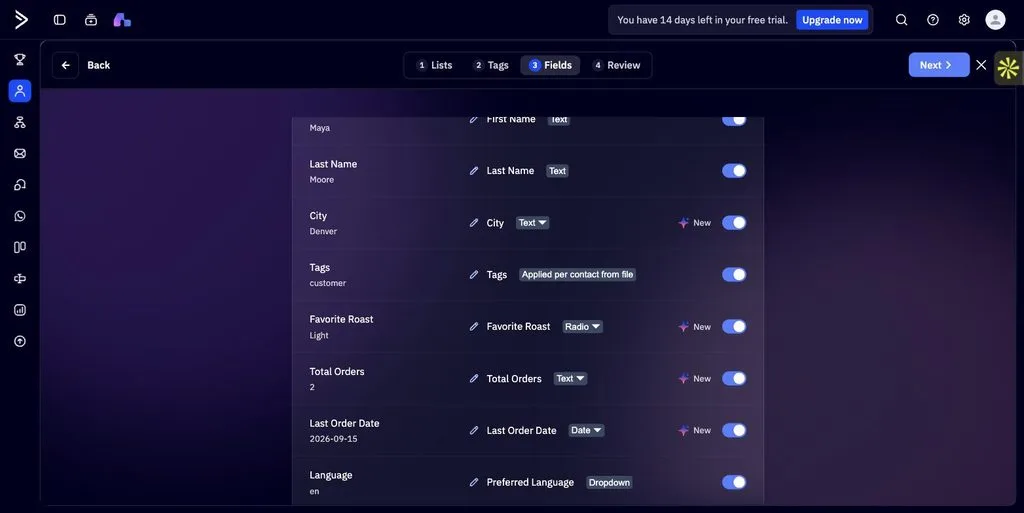
Importing your customer list is just as hands-off. I uploaded a plain spreadsheet and Active Intelligence mapped all nine columns on its own, turning ‘Favorite Roast’ into a selectable field and Last Order Date into a date. It missed one: Total Orders came through as text instead of a number.
Note: It builds on whatever you tell it at signup. I described my real business as a consulting one, so the coffee brand got a consulting strategy. Answer those first questions about the business you’re actually marketing.
You can try it yourself here.
2. How do I keep every email on-brand? (Adaptive Memory)
Every new tool, freelancer or AI chat usually needs your brand brief again. Wavelength keeps it.
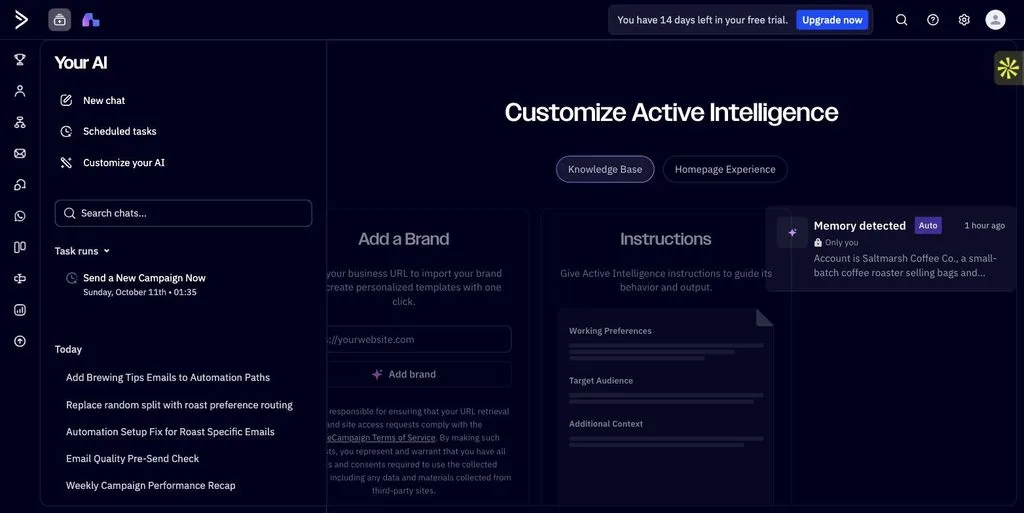
I pasted the Saltmarsh brand sheet once, and it now sits under Customize your AI as a “Memory detected” card marked Auto.
The test that matters came later. In a brand-new chat, I asked only for “three subject lines for our holiday gift box email”. It returned lines like “Gift box. Fresh roasted.” and noted it had kept them plain-spoken, with no exclamation marks and no discount language.
Those were my brand rules, and I never repeated them. For a business, that means anyone on the team gets on-brand drafts without hunting for the style guide.
3. What should I send my email list next? (Proactive Drafts)
For most small teams, the hard part isn’t writing the email. It’s deciding which email, to whom, and when. I asked one question: “What campaign should I send next, and why?”
It recommended re-engagement, citing my goal and peer data: among similar accounts, re-engagement averages “an 8.1% click rate, which is 119% above the peer group average”.
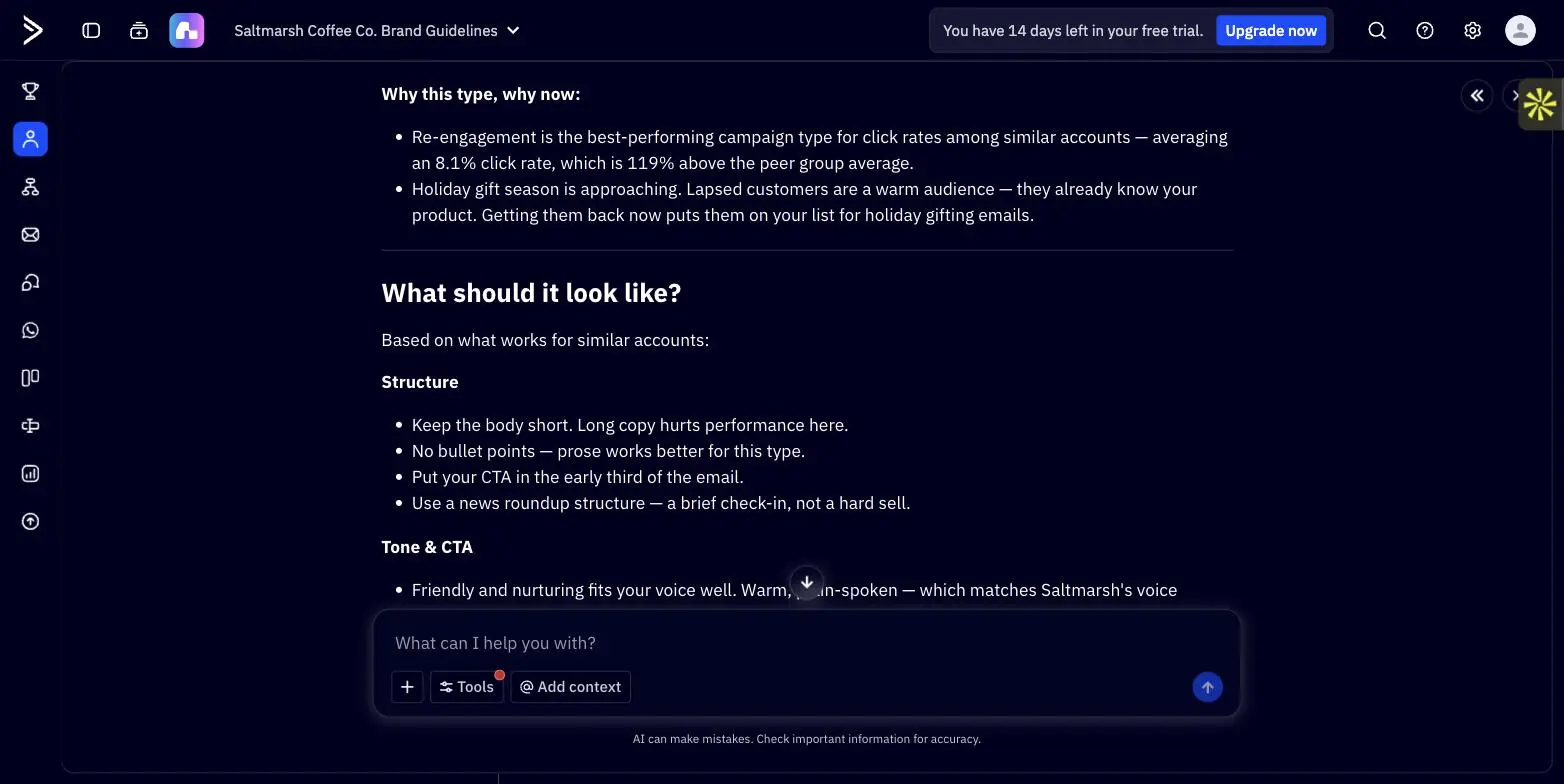
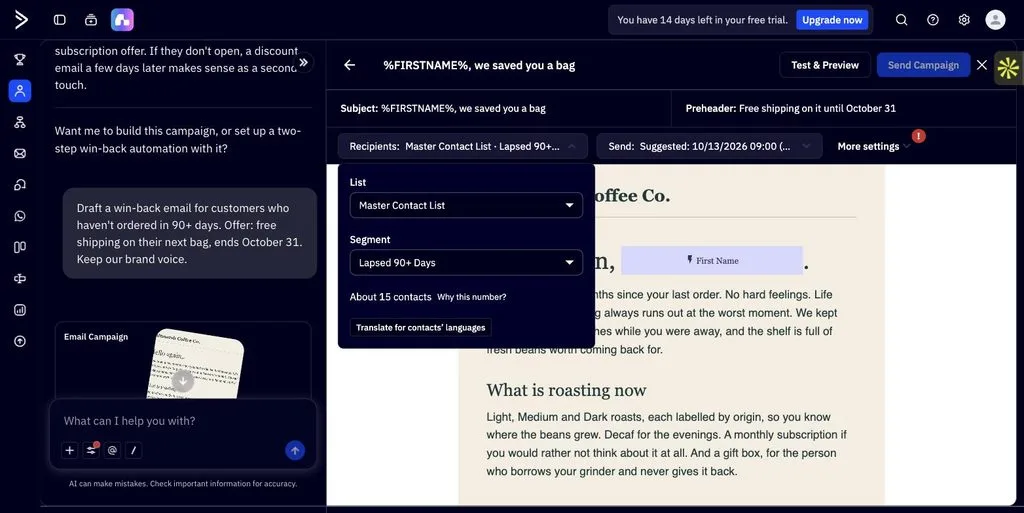
Then I asked for a win-back email for customers who hadn’t ordered in 90 days. Thirty seconds later I had a full campaign in the brand voice (“No hard feelings. Life gets busy, and the bag always runs out at the worst moment.”) and, without being asked, a new “Lapsed 90+ Days” segment built from the Last Order Date field.
It said “About 15 contacts”, exactly the number in my data, and suggested a send time. That’s the step a busy owner usually skips: working out who should actually get the email.
4. Why is nobody clicking my emails? (Content Performance)
Is a 20% open rate good? Most small businesses have no idea.
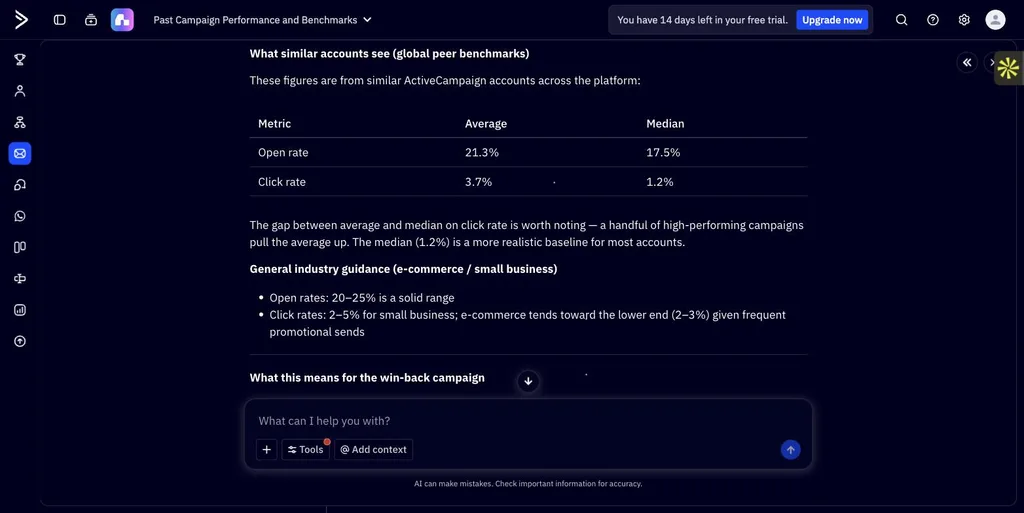
Every campaign has a one-click question, “How have similar campaigns performed?”, which returned peer benchmarks (open rate 21.3% average, 17.5% median; click rate 3.7% average, 1.2% median) and pointed out that the median “is a more realistic baseline for most accounts”. That’s an honest answer you can plan around.
Then I sent the win-back email. 15 went out, 3 were opened and nobody clicked. The report AI suggested no one clicked “simply because of low volume, not a content problem.” It was a content problem: the email it wrote had no button or link at all.
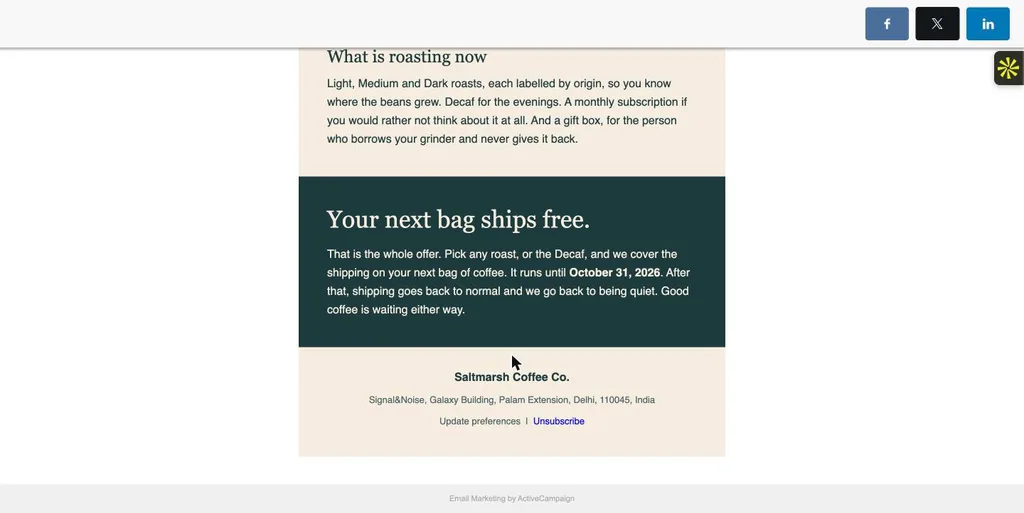
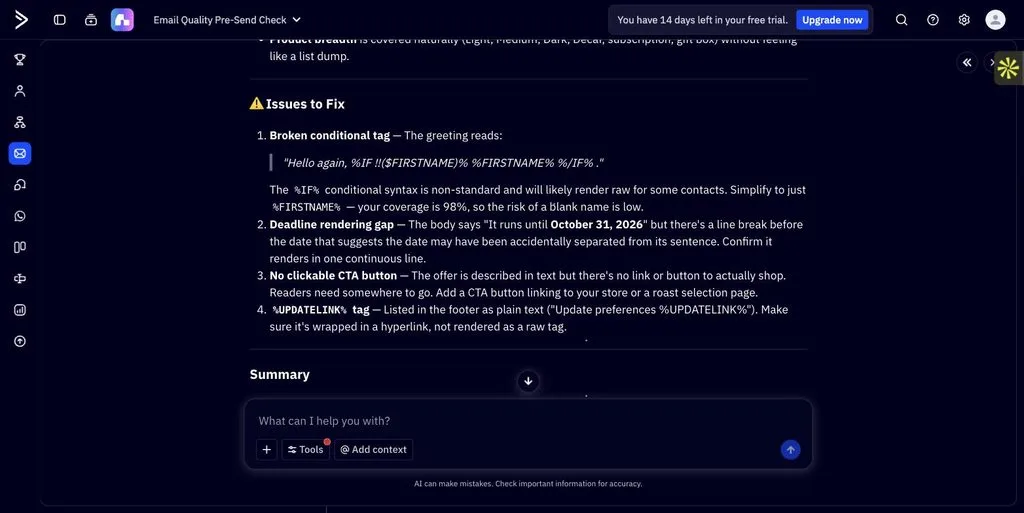
The fix was already in the product. On a copy of the email, the “Is my email ready to send?” check listed “No clickable CTA button” under Issues to Fix, and the AI added a “Pick your roast” button when asked. If you take one habit from this review, make it this: run that check before every send.
5. What are my competitors doing, and what’s coming up? (Web Search, Competitor and Industry Intelligence)
Market research is the first thing a small team drops. Wavelength does a useful version of it on request.
Asked what three competitors had been promoting, it searched the web, was upfront that results were “dominated by third-party coupon aggregators”, and still tied the findings to my goal: with everyone competing on price, “a message that isn’t about a coupon code will stand out.”
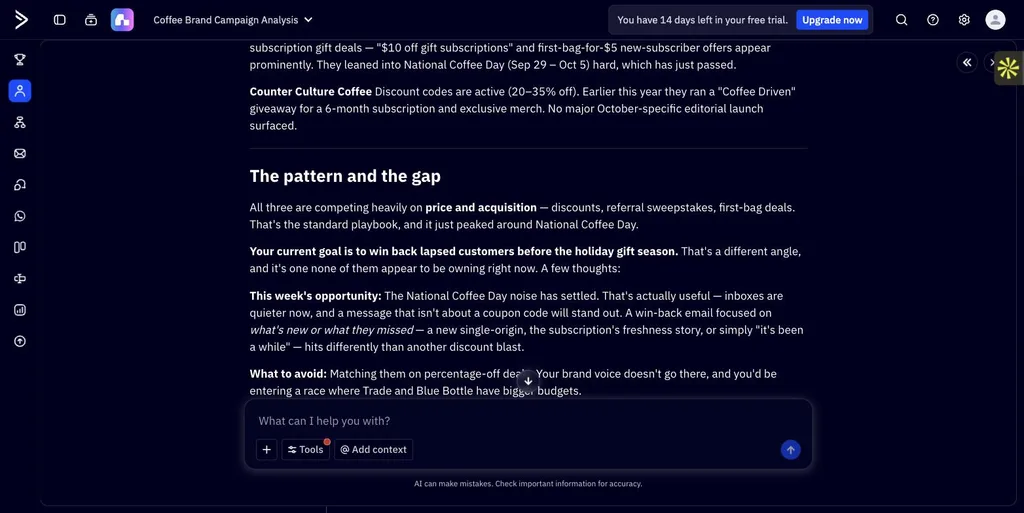
Proper competitor monitoring needs a Brand Kit, which starts from your website. Without one, it said so and read each competitor’s homepage directly instead. If you have a site, set the Brand Kit up first.
Industry Intelligence was the most useful research. Asked what a small online roaster should plan around over the next eight weeks, it returned cited market figures, seasonal demand signals, a dated campaign calendar up to the last holiday shipping window and a five-step plan starting with the win-back.
6. Is my email marketing actually working? (Scheduled Tasks)
Reporting is usually the first routine to slip. Here it takes one sentence.
I typed, “Every Monday at 9:00 AM, send me a recap of campaign performance, any automation issues, and one recommended next step,” and it became a named task with my time zone and me as the only recipient.
Changing the schedule later took one more plain-English message.
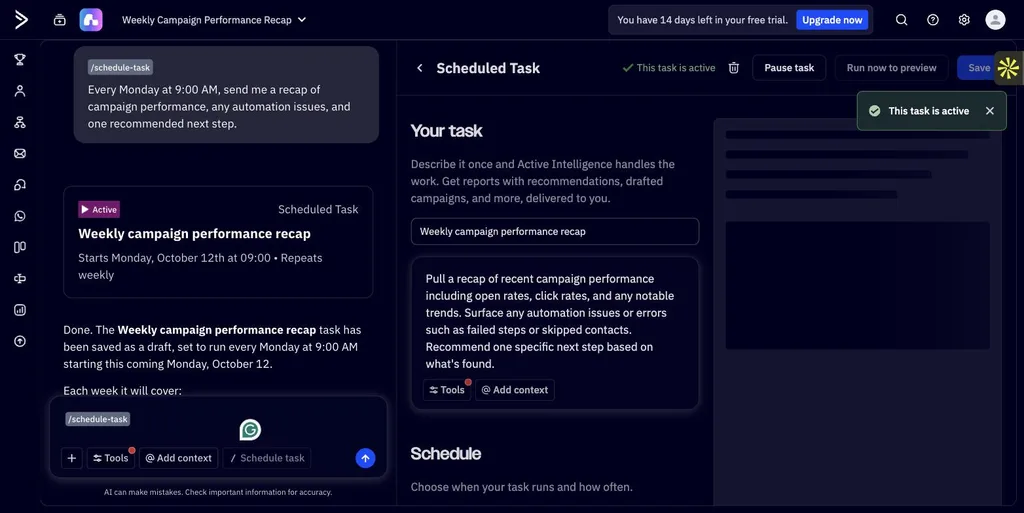
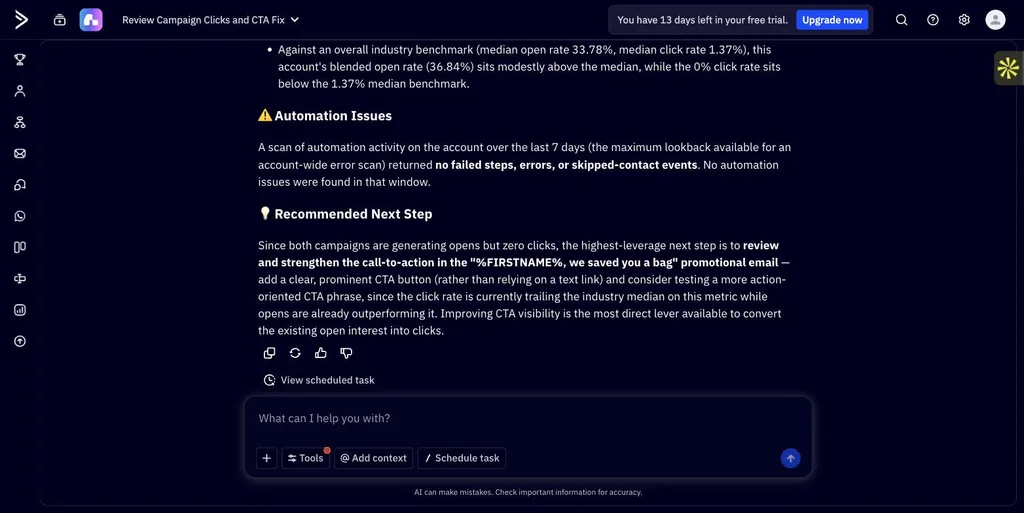
The first recap, run minutes after my campaign went out, reported “No email campaigns were sent on this account in the last 90 days”. The second, a few hours later, had caught up: both sends, a 36.84% blended open rate against a 33.78% industry median, 0% clicks, and one recommended next step: add a clear CTA button to the win-back email.
That’s the right call, made without being asked. Give a brand-new account a day before trusting the numbers.
7. Is my automation quietly broken? (Automation Monitoring and Intelligence to Action)
Automations are where small businesses lose money without noticing.
I asked the AI builder for a welcome flow with a planted mistake: send espresso tips only to contacts whose favorite roast is Espresso, a value none of my contacts had.
It built the flow in 30 seconds without a warning, and when four new subscribers went through it, they all fell into an empty branch. Nothing on screen flagged it, and the weekly recap later said automations “ran cleanly”.
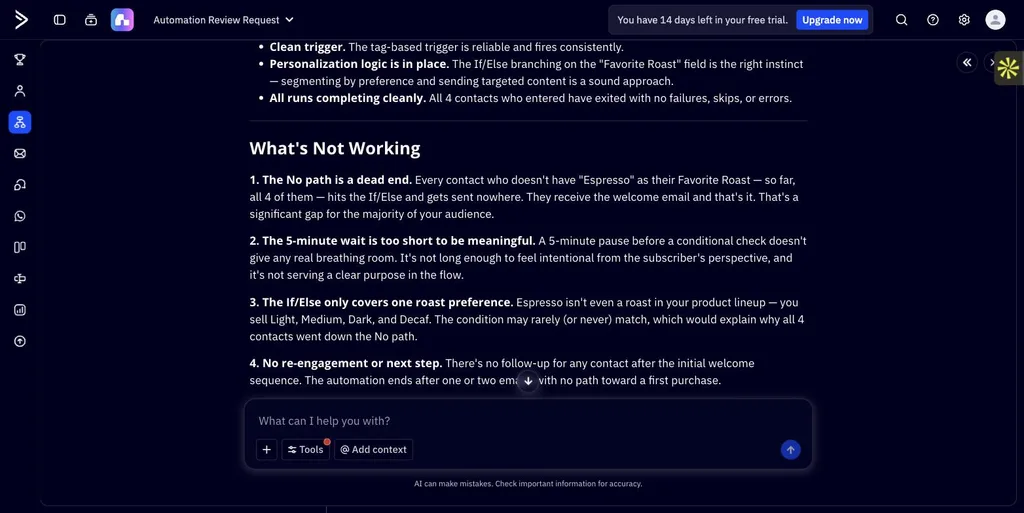
When I asked, it found the problem straight away. “Analyze this automation” reported “The No path is a dead end”, noted all 4 contacts had hit it, and spotted the cause: “Espresso isn’t even a roast in your product lineup”.
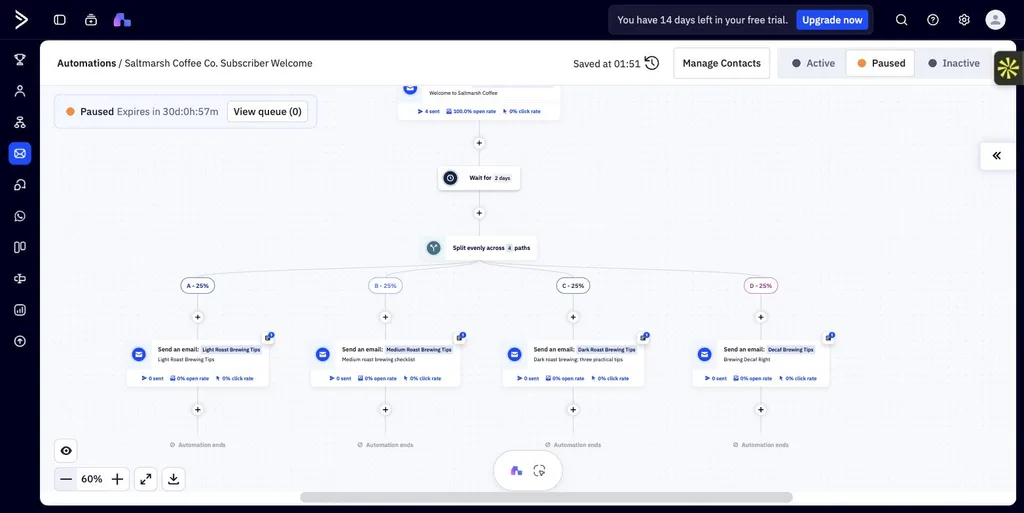
Fixing it went worse. Asked to rebuild the branch for Light, Medium, Dark and Decaf, it first created a random 25% split while describing it as a split “based on their Favorite Roast field”, then the right conditions with no emails attached. I left it paused.
The whole-account audit, Intelligence to Action, showed the same pattern: a useful checklist (leftover automations, missing product tags, unconfirmed DKIM and SPF), but it called the broken flow “working as expected”.
The takeaway for a business: ask it to analyze your key automations every month, and check every branch yourself after it edits one.
8. Can I email customers in their native language? (AI Email Translations)
If some of your customers speak another language, AI Email Translations sorts them for you. It split my 15 recipients into 13 English and 2 Spanish speakers on its own and drafted the Spanish version before the trial’s AI usage limit cut it off.
Have a native speaker check it: “we saved you a bag” became “te hemos ahorrado una maleta” (a suitcase).
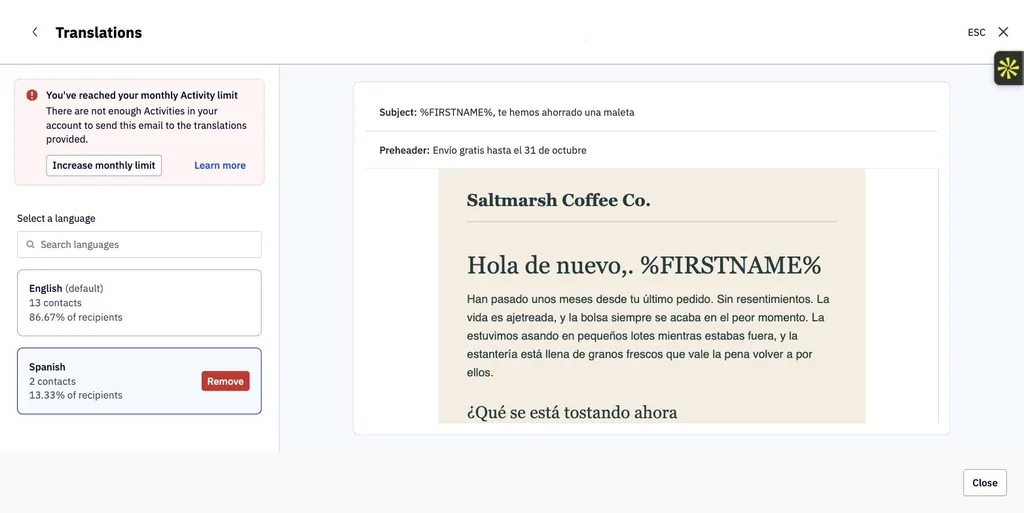
Image generation was less ready. The main chat said it couldn’t create images, while the email editor added a header image matching my description and said the generated image “wasn’t placed”.
What I didn’t test, and why it might matter to you
A trial account for a business with no website can’t exercise everything in the release. These are the parts I left out, with what ActiveCampaign says they do and who should care.
1. ActiveCampaign for Claude & ChatGPT. Part of the release’s AI Ecosystem, this connector promises to “bring your ActiveCampaign data into your favorite LLM, securely.” If you already draft copy or plan campaigns in Claude or ChatGPT, it means asking about your contacts and results there instead of switching tabs and copying numbers across.
2. Active Intelligence Connectors. These pull context from the rest of your marketing stack into Active Intelligence; ActiveCampaign’s example prompt is “Create a new Google Ads campaign.” Worth a look if your ads, store and email live in different tools and nobody has time to line them up.
3. Brand Monitoring. It tracks changes to your website’s content, promotions and messaging so your emails stay in sync with your site. For a shop that updates offers often, that replaces a manual check before every send. It needs a real website, which my test brand didn’t have.
4. External Signals. Holidays and outside events are meant to feed into campaign ideas automatically, so they arrive “pre-briefed”. I only saw this when I asked (the holiday calendar in section 5), not unprompted.
5. Campaign generation from a screenshot or PDF. I tried the webpage route, which produced a complete draft in my brand voice. Rebuilding an email you like from a screenshot or a PDF flyer is the version you could take advantage of.
Is Active Intelligence 3.0: Wavelength worth it for a small business?
| Job | How Wavelength handled it | What you still do |
|---|---|---|
| Getting started | Strategy, drafts and list import done for you | Answer signup questions accurately |
| Staying on-brand | Remembered the brand in every new chat | Write the brand sheet once |
| Choosing the next campaign | Picked the campaign and the exact 15 customers | Check the email before sending |
| Judging results | Honest benchmarks and a pre-send check | Run the check every time |
| Market research | Sourced calendar and competitor read | Verify dates and claims |
| Weekly reporting | One sentence became a weekly recap | Give new data a day |
| Automation health | Diagnosed a dead end on request | Ask monthly, check its edits |
| Translations | Sorted contacts by language automatically | Have a native speaker review |
For a small business, the value is in the steps nobody had time for: choosing the right customers, researching the season ahead, sending a report every week. Wavelength does those on day one with no history.
What it can’t do reliably yet is notice when something it made is broken, so treat it as a capable assistant whose work you check, not an autopilot.
It suits you if email and automations drive your revenue, you’re a team of one to five, and you’ll spend ten minutes reviewing what it prepares. It’s less useful if you send an occasional newsletter, because there isn’t much for it to work with.
Start a free 14-day ActiveCampaign trial and try Active Intelligence 3.0: Wavelength
Frequently asked questions
Does ActiveCampaign’s AI remember my brand?
Yes. Adaptive Memory saves details like your brand voice, tone and rules as memories you can see under Customize your AI, then applies them in new chats and drafts, so you don’t have to paste your brand guide every time.
Can ActiveCampaign build segments automatically?
Yes. When you ask Active Intelligence for a campaign aimed at a group, such as customers who haven’t ordered in 90 days, it can build the matching segment from your contact fields and attach it to the campaign. Check the conditions and contact count before you send.
How do scheduled tasks work in ActiveCampaign?
You describe a recurring job in one sentence, such as a weekly performance recap. Active Intelligence turns it into a task with instructions, a schedule and recipients, then runs it and emails you the result. You can change the schedule the same way, in plain English.
Does ActiveCampaign work with ChatGPT and Claude?
Yes. The ActiveCampaign for Claude & ChatGPT connector, part of the Active Intelligence 3.0: Wavelength release, brings your ActiveCampaign data into those assistants so you can ask about contacts, campaigns and results without switching tabs.
Can a small business run email marketing with Wavelength and no marketer?
It can take over much of the planning, drafting and reporting, but not the final check. AI-built emails and automations can still go out with a missing link or a broken branch, so someone should review its work before it goes live.