
Marketing Video Maker Tools Consultants and Small Businesses Actually Use
Compare 7 marketing video maker tools for SMBs — build explainer, how-to, and SaaS onboarding videos without a video team.
A solo consultant or a five-person agency doesn’t need a video department — they need a marketing video maker that can turn a service breakdown into an explainer video, a process into a how-to, or a signup flow into a SaaS onboarding video, without waiting on a freelancer’s calendar. This guide compares seven tools built for exactly that: no editing background required, no dedicated video hire.
What to Look for in a Marketing Video Maker
For SMBs producing explainer, how-to, and onboarding video specifically, three things matter more than raw feature count:
- Time to first draft. An explainer or onboarding video usually needs to ship alongside a product update or a new offer — if the tool takes longer to learn than to just hire someone, it’s not saving you anything.
- Step-by-step clarity, not just polish. How-to and onboarding videos live or die on whether a viewer can follow along. The best tools keep pacing and on-screen text legible instead of prioritizing flashy transitions.
- Brand consistency without a designer. Fonts, colors, and a consistent look across every explainer, how-to, and onboarding clip, applied automatically.
This page also contains affiliate links.
The 7 Best Marketing Video Maker Tools for Consultants and Small Businesses
| Tool | Best For | Free to Start | Starting Price | Standout Feature |
|---|---|---|---|---|
| ngram | Turning briefs, docs, and recordings into a polished marketing video | Yes, no card required | Plans start at $29/month, or $23.20/month billed annually | Prompt, script, URL, or recording in — a branded, editable video draft out |
| InVideo | Fast, prompt-to-video drafts for solo marketers | Yes, free tier with watermark | From ~$17–28/mo | Prompt or URL to a full edited draft, frontier video models included |
| Klap | Turning webinars and talks into social clips | Yes, one free video, no card | From $29/mo | AI finds the most quotable moments in long recordings and cuts them into clips automatically |
| Jupitrr | Talking-head videos that need visual polish | Yes, free tier available | From $49/mo | Auto-generates contextual B-roll and captions over raw camera footage |
| Animoto | Simple, no-frills promotional slideshows | Yes, free plan | From ~$16/mo | Licensed stock library and one-click resizing across every platform |
| KreadoAI | Budget-friendly avatar-led pitch videos | Yes, free credits, no card | Paid plans vary | Generates a spokesperson-style video from a script or URL in minutes |
| Akool | Multi-language client-facing video | Yes, 100 free credits | Paid plans vary | AI avatar generation plus 155+ language dubbing with lip-sync |
1. ngram
ngram is built as an AI video generator for business video, taking a prompt, script, URL, document, deck, image, or recording and turning it into a planned, branded, editable video draft. It’s positioned specifically for teams without a dedicated video person — the marketing manager, the founder, or the solo consultant — who need a editable first cut instead of a rough draft that still needs hours of post-production. It also handles auto-captioning and video translation out of the box, so a single explainer or campaign video can be localized for a client in a different market without booking new voice talent. A free plan is available and doesn’t require a credit card to start.
Good for: SMB teams that already have the explainer script, how-to steps, or onboarding copy written and want it turned into video — no agency brief required.
Try ngram’s AI video generator →
2. InVideo
InVideo AI takes a prompt-first approach: describe the video and the platform handles script, footage, voiceover, subtitles, and music from a single input, with access to leading video-generation models bundled into one subscription. A free plan is available, with paid tiers starting in the high-$20s per month. It works best as a fast first draft rather than a finished, ready-to-publish piece, since the AI-written scripts can read a little generic without a manual pass.
Good for: solo consultants and SMB teams drafting a first-pass explainer or how-to video and want one tool to script, edit, and export without stitching together several apps.
3. Klap
Klap uses AI to transform long recordings — YouTube videos, podcasts, and interviews — into TikToks, Shorts, and Reels in one click, analyzing the transcript, tone, and visual cues to identify the most compelling segments. It’s built around repurposing spoken long-form video specifically, working best for content with clear speech, like interviews, webinars, and training sessions. A free trial lets you create one video with no credit card required, after which it’s $29 a month for continued use.
Good for: SMBs that already record a walkthrough, webinar, or training session and want it broken into shareable how-to clips instead of filming separate short-form content from scratch.
4. Jupitrr
Jupitrr AI helps business owners create scroll-stopping talking-head videos by automatically adding B-roll, captions, and hook text to raw footage. Its integrated premium stock library gives podcasters and content marketers access to contextual visuals without separate licensing fees, matching relevant footage and images to what’s being said. A free tier is available, with paid plans starting around $49 a month.
Good for: SMBs recording their own how-to or product-onboarding walkthroughs on camera and want the finished cut to look edited without learning an editor.
5. Animoto
Animoto pairs its long-running drag-and-drop editor with an integrated AI video maker: enter a goal or URL and the AI handles pacing, clip selection, and initial structure. Its licensed Getty Images and Shutterstock library removes the copyright risk of sourcing your own footage, and one-click resizing covers the formats each platform expects. A free plan is available, with paid tiers starting in the mid-teens per month.
Good for: small business owners who want the simplest possible interface for a straightforward explainer or promo video.
6. KreadoAI
KreadoAI can take a script or product URL and generate a multilingual AI-avatar video in minutes, aimed at social and general marketing use. New accounts get a batch of free credits with no credit card required, enough to test the avatar and URL-to-video workflow before paying. It’s one of the more budget-friendly avatar tools on this list, though it lacks the collaboration features larger teams may want.
Good for: SMBs that want an avatar-led explainer or onboarding video without anyone on the team going on camera.
7. Akool
Akool’s standout feature is video translation: it transcribes, translates, generates dubbed audio, and adjusts lip movements to match the new language. It also offers talking-avatar video generation from a script, useful for a consultant who wants a consistent on-camera presence without filming every version. New users get a batch of free credits to test the tools before committing to a paid plan.
Good for: SMBs that need the same explainer or onboarding video localized for multiple language markets from one source script.
Choosing Between These Tools
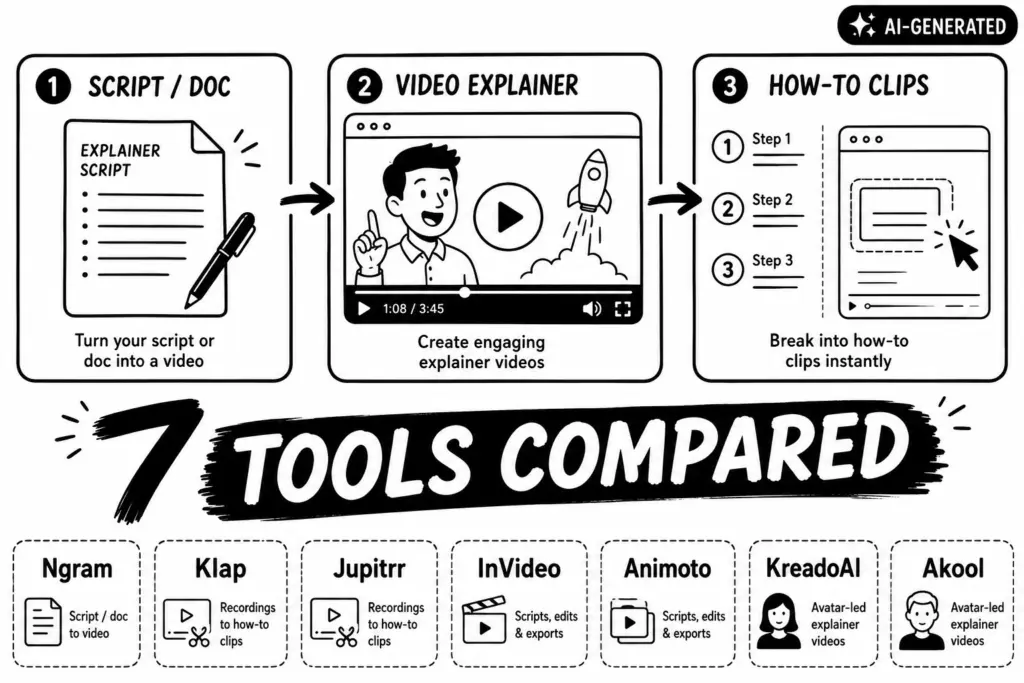
- Turning an explainer script or onboarding doc into video: ngram
- Breaking a recorded walkthrough into how-to clips: Klap or Jupitrr
- One general-purpose tool for scripts, edits, and exports: InVideo or Animoto
- Avatar-led explainer or onboarding video without filming yourself: KreadoAI or Akool
FAQ
Is there a free marketing video maker for explainer or onboarding videos?
Yes — ngram, InVideo, Klap, Jupitrr, Animoto, KreadoAI, and Akool all offer a free tier, free credits, or a no-card trial to test the workflow before paying. If you are looking for more options, check out this list on altdirectory.fyi. For ecommerce businesses specifically, check out these tools listed on d2c.fyi.
Can I turn a product walkthrough or training recording into a how-to video?
Yes. Klap and Jupitrr are both built around repurposing existing spoken-word recordings — webinars, walkthroughs, training sessions — into short, publishable how-to clips, rather than requiring you to film new footage from scratch.
What’s the best tool for a SaaS onboarding video specifically?
ngram is built for turning existing product docs or scripts into a branded onboarding video with captions and translation included. If you’d rather have an AI avatar walk new users through the product without anyone on the team going on camera, KreadoAI or Akool are the more budget-friendly avatar-led options.
Do I need on-camera presence to use these tools?
No. KreadoAI and Akool both generate AI avatar presenters from a script, which is useful if you want a consistent on-screen presence for your explainer or onboarding video without filming every version yourself.