
Pipedrive vs folk.app Comparison: Which CRM Delivers Better ROI for Your Sales Team?
Pipedrive vs folk.app comparison explores pricing, features, and which CRM suits your sales team with a detailed analysis of 9 key factors.
Choosing between Pipedrive and folk.app for your CRM can feel overwhelming. Both platforms promise to streamline your sales process, but they take fundamentally different approaches. This Pipedrive vs folk.app comparison breaks down 9 critical factors to help you make the right choice for your business.
After analyzing both platforms across pricing, features, automation capabilities, and user experience, we’ve identified clear winners in different categories. Whether you’re a startup founder managing your first sales pipeline or a sales director scaling a growing team, this guide will help you understand which CRM aligns with your specific needs.
Quick Comparison: Pipedrive vs folk.app at a Glance
| Factor | Pipedrive | folk.app |
|---|---|---|
| Best For | Traditional sales teams with structured pipelines | Modern teams prioritizing relationships and collaboration |
| Starting Price | Lite: $14/user/month | Standard: $20/user/month |
| User Limit | Unlimited users on all plans | Unlimited members on all plans |
| Email Enrichment | Via AI Enrich (paid add-on) | 500-1,000/month included |
| Chrome Extension | No | Yes (folkX) |
| Learning Curve | Low | Moderate |
1. Pricing Comparison: Pipedrive vs folk.app Cost Analysis as of Dec 2025
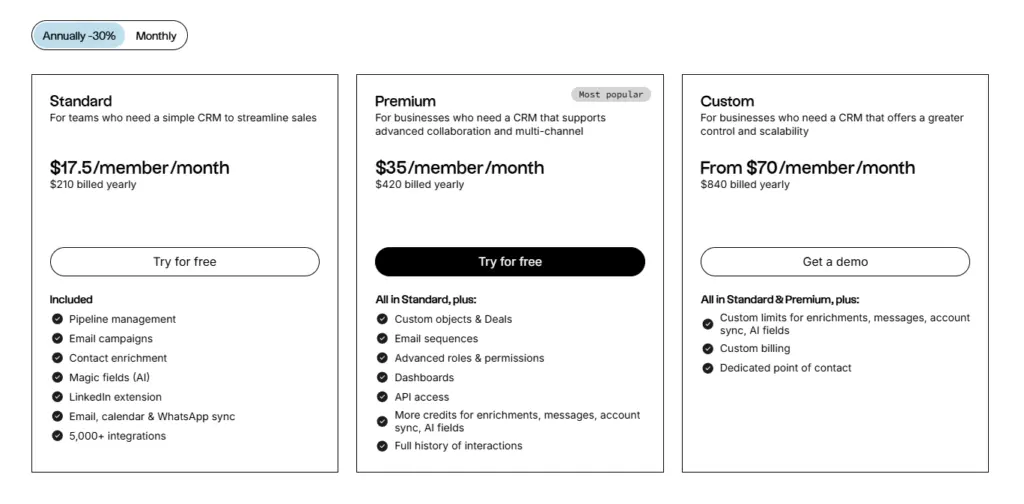
When comparing Pipedrive vs folk.app pricing, the decision often comes down to your team size and feature requirements.
Pipedrive Pricing Structure
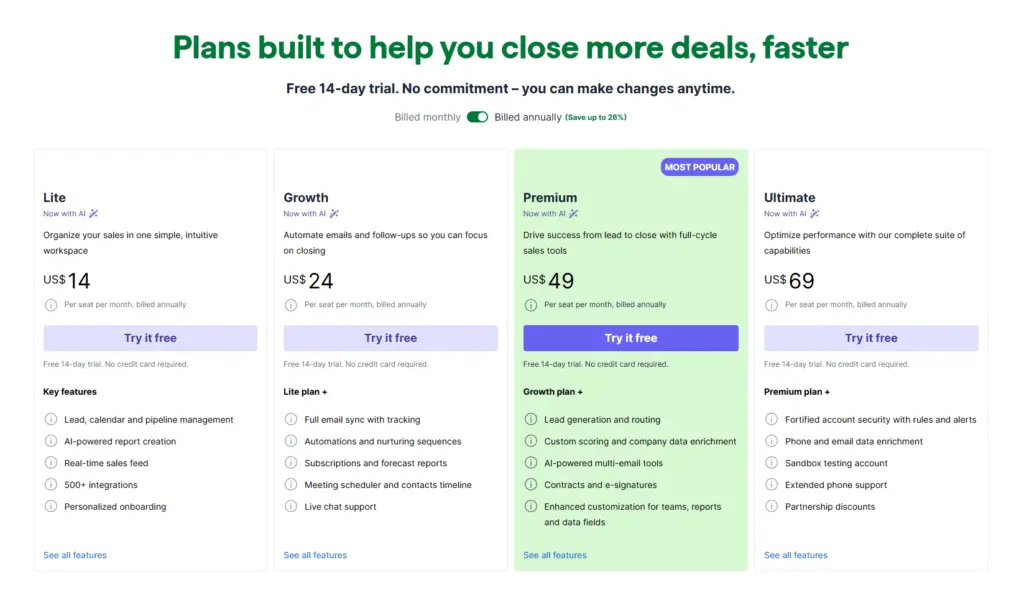
Pipedrive Paid Add-ons:
- LeadBooster: $32.50/month per company
- Projects: $6.67/month per company
- Campaigns: $13.33/month per company
- Web Visitors: $41/month per company
- Smart Docs: $32.5/month
folk.app Pricing Structure
2. Core CRM Capabilities: Lead and Pipeline Management
Both platforms excel at fundamental CRM tasks, but their approaches differ significantly in this Pipedrive vs folk.app feature comparison.
Lead Management Comparison
| Feature | Pipedrive | folk.app |
|---|---|---|
| Lead Storage | From 2,500 per user | Unlimited on all plans |
| Contacts/People | ✓ Comprehensive | ✓ Comprehensive |
| Organizations | ✓ Company tracking | ✓ Company tracking |
| Custom Fields | Up to 250 | Flexible custom fields |
| Duplicate Management | ✓ Automatic detection | ✓ Auto-merge contacts |
| Activity Timeline | ✓ Chronological view | ✓ Full interaction history (Premium+) |
Pipeline Management Features
Pipedrive Pipeline Strengths:
- Multiple pipelines for different products/teams
- Drag-and-drop kanban boards
- Customizable pipeline stages
- Visual pipeline health indicators
folk.app Pipeline Strengths:
- Streamlined sales pipeline focus
- Groups & Views for organization
- Flexible relationship tracking
Pipedrive provides more traditional, robust pipeline visualization with features that proactively identifies stalled deals. This makes it superior for teams with complex, multi-stage sales processes.
folk.app takes a more relationship-centric approach, emphasizing connections between people and companies rather than rigid pipeline stages. This works exceptionally well for relationship-driven sales and networking-focused businesses.
3. Email Capabilities: Communication and Outreach
Email functionality is crucial in any Pipedrive vs folk.app comparison, as it directly impacts daily sales activities.
Email Feature Comparison Table
| Feature | Pipedrive | folk.app |
|---|---|---|
| Email Sync | 2-way sync (3-10 accounts) | 2-way sync (1-5 accounts) |
| Historical Import | ✓ All plans | Not specified |
| Bulk Email | ✓ All plans | ✓ Campaign feature |
| Email Templates | ✓ All plans | ✓ Message templates |
| Dynamic Tags | ✓ Personalization | ✓ Personalization |
| Email Sequences | ✓ Pro+ ($24+) | ✓ Premium+ ($35+) |
| Open Tracking | ✓ Pro+ ($24+) | ✓ Campaign analytics |
| Sending Limits | Rate limiting | 2,000-5,000/user/month |
| AI Email Writer | ✓ Rewrite (Growth+) | Included in AI features |
| Shared Inboxes | ✓ Premium+ | No |
| Remove Branding | ✓ Plus+ | No |
Email Workflow Analysis
Pipedrive Email Advantages:
- More connected email accounts (up to 10 on Growth)
- AI Email Rewrite feature for improving drafts
- Multiple email accounts per user for agency work
folk.app Email Advantages:
- Clear monthly sending limits (predictable usage)
- Integrated campaign analytics
- Chrome extension for LinkedIn/Gmail integration
For high-volume email outreach, Pipedrive offers more flexibility and higher limits. However, folk.app provides clearer, more predictable pricing for email campaigns.
- Winner for Email Power Users: Pipedrive
- Winner for Predictable Email Costs: folk.app
4. Automation and AI Features: Efficiency Tools
The Pipedrive vs folk.app automation comparison reveals different philosophies about workflow efficiency.
Automation Capabilities Comparison
| Feature Type | Pipedrive | folk.app |
|---|---|---|
| Workflow Automation | ✓ Essentials+ | Not available yet |
| Email Sequences | ✓ Growth+ ($24+) | ✓ Premium ($35+) |
| AI Lead Summaries | ✓ Premium + | Not specified |
| AI Report Creation | ✓ All plans | Not specified |
| Magic Fields (AI) | No | ✓ 2,000-5,000/month |
| Research Assistant | No | ✓ 200/month |
| Follow-up Assistant | No | ✓ All plans |
| Auto-labeling | No | ✓ Relationship intelligence |
| Lead Assignment | ✓ Growth+ | Not specified |
| Update CRM Automation | ✓ Growth+ | Included |
AI Feature Deep Dive
Pipedrive AI Capabilities:
- AI Lead Summaries catch you up on prospect history
- AI-powered report creation from text prompts
- AI Email Rewrite for message optimization
- AI Enrich for data enrichment (usage-based add-on)
folk.app AI Capabilities:
- Magic Fields automatically populate data using AI
- Research Assistant gathers information (200 queries/month)
- Follow-up Assistant suggests next actions
- Relationship intelligence tracks connection strength
- Auto-labeling categorizes contacts automatically
folk.app integrates AI more deeply into daily workflows, with features that proactively suggest actions and automatically enrich data. The Magic Fields feature alone can save hours of manual data entry.
Pipedrive focuses AI on insights and reporting, helping managers understand their pipeline health and sales team performance.
- Winner for AI-Powered Productivity: folk.app
- Winner for AI Analytics: Pipedrive
5. Data Enrichment and Intelligence
Contact data quality can make or break your sales efforts. Here’s how Pipedrive vs folk.app compare on data enrichment.
Data Enrichment Comparison
| Feature | Pipedrive | folk.app |
|---|---|---|
| Company Enrichment | ✓ AI Enrich (paid, usage-based) | ✓ Automatic (all plans) |
| People Enrichment | ✓ AI Enrich (paid, usage-based) | ✓ Automatic (all plans) |
| Email Enrichment | ✓ Ultimate only | ✓ 500-1,000/month included |
| Phone Enrichment | ✓ Ultimate only | Not specified |
| Chrome Extension | No | ✓ folkX extension |
| LinkedIn Integration | Via extension | ✓ Native via folkX |
| Monthly Limits | Usage-based (pay per use) | 500-1,000 enrichments/month |
Enrichment Philosophy Differences
Pipedrive Enrichment Model:
- AI Enrich available on Growth+ plans
- Usage-based pricing for enrichment
- Phone and email enrichment on Ultimate plan ($69/user)
- Manual control over when to enrich
folk.app Enrichment Model:
- Automatic enrichment included in all plans
- Fixed monthly enrichment quota (500-1,000)
- Chrome extension for instant enrichment from LinkedIn
- Proactive enrichment suggestions
- Relationship intelligence tracking
folk.app makes data enrichment a core feature rather than an add-on. The folkX Chrome extension allows you to enrich contacts directly from LinkedIn, Twitter, or other platforms with a single click.
Pipedrive offers powerful enrichment but at additional cost. For teams needing extensive phone number enrichment, the Ultimate plan becomes necessary.
- Winner for Built-in Enrichment: folk.app
- Winner for Phone Data Enrichment: Pipedrive (Ultimate plan)
Ready to see which CRM fits your workflow?
Try Pipedrive free for 14 days or explore folk.app’s free trial.
6. Reporting and Analytics: Insights That Drive Decisions
Sales leaders need clear visibility into pipeline health and team performance. Here’s the detailed breakdown of Pipedrive’s Reporting capabilities across plans.
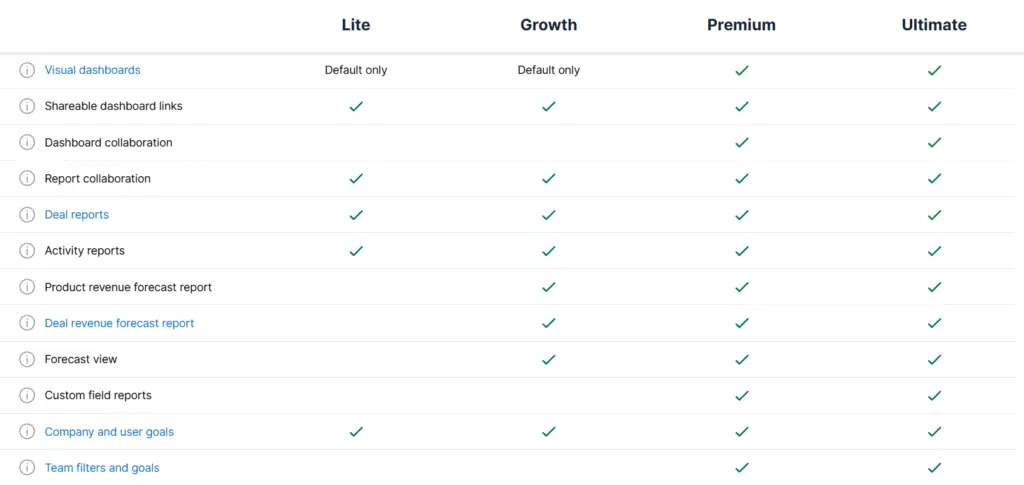
Pipedrive provides significantly more robust reporting, especially for traditional sales metrics. The Opportunity Funnel Report helps identify bottlenecks in your sales process, while the Leaderboard feature drives healthy competition among team members.
folk.app offers essential reporting but focuses more on relationship metrics and campaign performance rather than traditional pipeline analytics.
- Winner for Sales Analytics: Pipedrive (clear advantage)
- Winner for Campaign Reporting: folk.app
7. Integration Ecosystem: Connecting Your Tools
No CRM operates in isolation. Here’s the Pipedrive vs folk.app integration comparison.
Integration Overview
| Aspect | Pipedrive | folk.app |
|---|---|---|
| Total Integrations | 500+ Direct Integrations + 5,000+ via Zapier, Make, n8n | 5,000+ (via Zapier, Make, n8n) |
| Native Integrations | 100+ direct | Limited native |
| API Access | ✓ All plans | ✓ Premium+ |
| Webhooks | ✓ OAuth | Via API |
| Marketplace | ✓ Extensive | Via automation platforms |
| Calendar Sync | Google, Outlook (Essentials+) | Yes |
Pipedrive offers more native integrations with deep, purpose-built connections. The marketplace provides vetted integrations with extensive documentation.
folk.app relies more on automation platforms like Zapier and Make, which provides broader connectivity but may require more technical setup.
- Winner for Native Integrations: Pipedrive
- Winner for Integration Volume: folk.app (via Zapier/Make)
Security and Compliance
Enterprise teams need robust security. Here’s how both platforms measure up.
8. Security Features Comparison
| Feature | Pipedrive | folk.app |
|---|---|---|
| SOC2 Compliance | ✓ Type 2 | Not specified |
| Two-Factor Auth | ✓ All plans | Not specified |
| SSO | ✓ Google (all plans) | |
| SAML SSO | Not specified | Not specified |
| GDPR Compliant | ✓ Yes | Implied (EU-based) |
| Data Encryption | ✓ Transit & at rest | Standard encryption |
| IP Restrictions | ✓ Premium+ | Not specified |
| User Permissions | ✓ 4 roles (Essentials+) | ✓ Advanced (Premium+) |
| Field Restrictions | ✓ Growth+ | Not specified |
| Audit Logs | Activity timeline | Not specified |
Pipedrive provides more comprehensive enterprise security features, including SOC2 Type 2 certification, which is crucial for compliance-focused industries.
folk.app covers essential security but doesn’t advertise advanced enterprise security features prominently.
Winner for Enterprise Security: Pipedrive
9. User Experience and Learning Curve
The ease of adoption can determine CRM success. Here’s the Pipedrive vs folk.app usability comparison.
Interface Comparison
| Aspect | Pipedrive | folk.app |
|---|---|---|
| Learning Curve | Low | Moderate |
| Mobile App | ✓ iOS & Android | Not specified |
| Desktop App | Web-based | Web-based |
| Chrome Extension | For Gmail | ✓ folkX (native) |
| Interface Style | Traditional CRM | Modern, relationship-focused |
| Customization | Extensive | Moderate |
| Onboarding | Self-service (Ultimate: personalized) | Self-service (Custom: migration) |
Pipedrive User Experience:
- Traditional CRM interface familiar to sales teams
- Drag-and-drop pipeline views
- Customizable dashboards
- Mobile apps for on-the-go access
- Visual pipeline management
folk.app User Experience:
- Modern, minimalist interface
- Relationship-centric design
- Quick setup and minimal configuration
- Chrome extension for seamless LinkedIn integration
- Intuitive contact management
folk.app is often praised for its intuitive design and minimal learning curve, making it ideal for teams transitioning from spreadsheets or simpler tools.
Pipedrive offers more features, which comes with added complexity. However, its interface follows CRM conventions that experienced sales teams will recognize.
- Winner for Ease of Use: folk.app
- Winner for Advanced Users: Pipedrive
Making Your Decision: Pipedrive vs folk.app
After examining 9 critical factors in this Pipedrive vs folk.app comparison, here’s our recommendation framework:
Choose Pipedrive if you:
- Need built-in calling and SMS capabilities
- Manage complex, multi-stage sales pipelines
- Require extensive sales reporting and forecasting
- Have a team that makes 50+ calls per day
- Need enterprise-grade security (SOC2)
- Want robust pipeline management features
- Value traditional CRM workflows
- Need call coaching and training features
Start your Pipedrive free trial →
Choose folk.app if you:
- Prioritize relationship management over rigid pipelines
- Want built-in data enrichment without add-on costs
- Need a Chrome extension for LinkedIn prospecting
- Prefer a modern, intuitive interface
- Value AI-powered contact intelligence
- Want predictable pricing with fewer add-ons
- Have a smaller team (under 10 people)
- Focus on email outreach over calling
Hybrid Scenario
Some teams successfully use both platforms: Pipedrive for managing active sales opportunities and calling workflows, while folk.app handles relationship nurturing and networking activities. This approach requires integration setup but leverages each platform’s strengths.
Frequently Asked Questions: Pipedrive vs folk.app
Q: Can I migrate from Pipedrive to folk.app or vice versa?
Yes. folk.app offers migration services on their Custom plan. Pipedrive data can be exported via CSV. Both platforms support data import functionality.
Q: Which CRM has better mobile support?
Pipedrive has dedicated iOS and Android apps with full functionality. folk.app’s mobile support is less prominent in their marketing but offers web-based mobile access.
Q: Do both platforms offer free trials?
Yes. Pipedrive offers a 30-day free extended trial with no credit card required. folk.app provides trial access as well (check their website for current terms).
Q: Which CRM is better for startup founders?
For solo founders or teams under 5 people on a tight budget, Pipedrive’s Lite plan ($14/user) provides excellent value. For founders who value modern UX and built-in enrichment, folk.app’s Standard plan ($20/user) may be worth the premium.
Q: Can I use both CRMs simultaneously?
Technically yes, but not recommended. The administrative overhead and risk of data inconsistency outweigh most benefits. Choose one as your source of truth.
Final Verdict: Which CRM Wins?
In this comprehensive Pipedrive vs folk.app comparison, there’s no universal winner—the right choice depends on your specific needs:
Pipedrive wins for:
- Traditional B2B sales teams
- Call-heavy sales processes
- Complex pipeline management
- Enterprise security requirements
- Comprehensive reporting needs
folk.app wins for:
- Relationship-driven sales
- Modern, tech-savvy teams
- LinkedIn prospecting workflows
- Simple, predictable pricing
- AI-powered productivity
Both platforms excel in their respective niches. Pipedrive remains the stronger choice for traditional sales organizations that need robust pipeline management and built-in communication tools. folk.app shines for modern teams that prioritize relationships, data enrichment, and a streamlined user experience.
The best approach? Take advantage of both platforms’ free trials. Spend a week using each with your actual sales workflow. The right CRM should feel natural to your team’s process, not force you to adapt to its structure.
Ready to make your decision?